Currency Exchange and Time Zone Conversion - Essential Tools for Global Work
Learn how to calculate exchange rates and convert time zones for international transfers, shopping, and global meetings.
Essential Tools for the Global Era
We shop internationally, invest in foreign stocks, and video conference with multinational teams. Two conversions have become daily necessities: currency exchange and time zone conversion.
"This item is $49.99 - how much is that with shipping in my currency?" "The meeting with the New York office is at 3 PM - what time is that locally?"
Handle these calculations quickly and accurately with Toolypet's Currency Converter and Time Zone Converter.
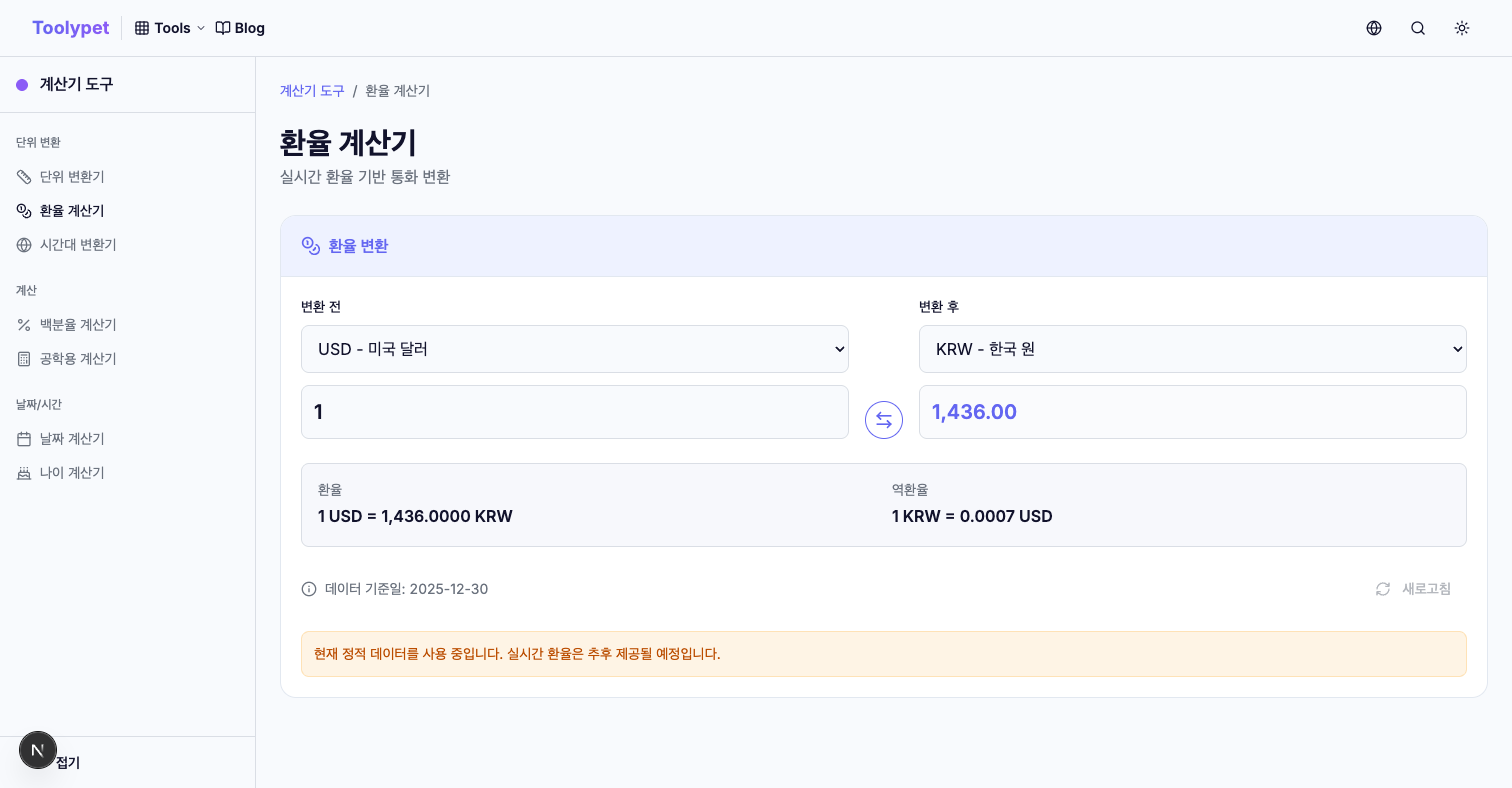
Currency Converter - Exchange Rate Calculator
Support for 24 Major Currencies
Currency Converter supports conversions between 24 major currencies based on Federal Reserve (FRED) data.
Supported Currencies:
- Major: USD, EUR, JPY, GBP, CHF, CAD, AUD
- Asia: CNY, KRW, HKD, SGD, INR, TWD, THB, MYR
- Americas: MXN, BRL
- Europe: SEK, NOK, DKK
- Other: NZD, ZAR
How to Use
- Select Currencies: Choose source currency (e.g., USD) on the left, result currency (e.g., EUR) on the right
- Enter Amount: Input the amount to convert
- View Results: See converted amount with real-time exchange rate
Click the swap button to exchange the two currencies. Quickly switch from USD → EUR to EUR → USD.
Practical Currency Conversion Examples
International Shopping:
- Product $150 + Shipping $30 = $180
- Converted to local currency based on current rate
- Check customs threshold ($150+)
International Investing:
- $1,000 stock investment in local currency
- $50 dividend receipt value
Travel Budgeting:
- Japan trip budget ¥100,000 conversion
- Europe trip €500 conversion
Important Notes for Currency Conversion
Mid-rate vs Actual Applied Rate: Currency Converter shows the mid-market rate. When actually exchanging or transferring money:
- Buying rate: Higher than mid-rate
- Selling rate: Lower than mid-rate
- Transfer/card fees: Additional costs apply
Actual costs may be 1-3% higher than calculated amounts.
Exchange Rate Fluctuations: Exchange rates change in real-time. Toolypet's rate data updates daily, with the exact reference date shown on screen.
Time Zone Converter - World Time Conversion
Essential Tool for Global Collaboration
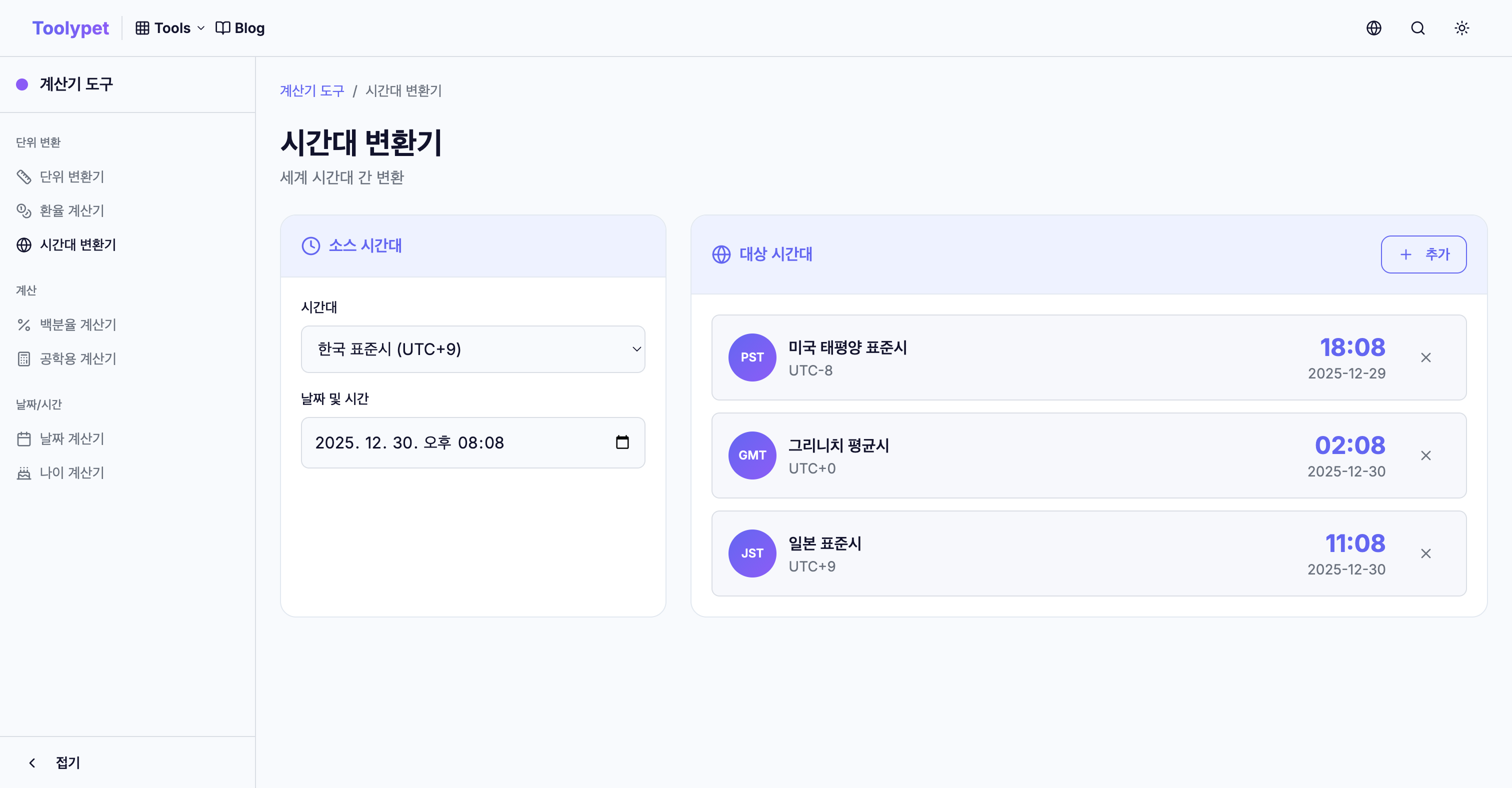
Working with multinational teams or meeting overseas clients requires time zone conversion.
Supported Time Zones
Asia:
- KST (Korea, UTC+9)
- JST (Japan, UTC+9)
- CST (China, UTC+8)
- IST (India, UTC+5:30)
- SGT (Singapore, UTC+8)
Europe:
- GMT (UK, UTC+0)
- CET (Central Europe, UTC+1)
- EET (Eastern Europe, UTC+2)
Americas:
- EST (US Eastern, UTC-5)
- CST (US Central, UTC-6)
- MST (US Mountain, UTC-7)
- PST (US Pacific, UTC-8)
Oceania:
- AEST (Australia Eastern, UTC+10)
- NZST (New Zealand, UTC+12)
How to Use
- Select Source Time Zone: e.g., EST
- Enter Date/Time: e.g., 2025-01-15 3:00 PM
- Select Target Time Zones: Up to 5 simultaneously
- View Results: Local time for each zone
When dates change, "+1 day" or "-1 day" indicators prevent confusion.
Scheduling Global Meetings
US-Europe Meeting:
Scheduling a 10 AM EST meeting:
- London (GMT): 3 PM ✓
- Paris (CET): 4 PM ✓
Scheduling a 5 PM EST meeting:
- London (GMT): 10 PM ✗ (too late)
- Tokyo (JST): Next day 7 AM ✓
Multi-Region Meeting:
Finding overlapping business hours:
- Use Time Zone Converter to display multiple zones
- Identify windows where all parties are available
Daylight Saving Time (DST) Considerations
Many countries including the US and Europe observe DST.
- US DST: Second Sunday of March ~ First Sunday of November
- Europe DST: Last Sunday of March ~ Last Sunday of October
During DST, clocks move 1 hour forward:
- Normal US-UK: 5 hours difference
- During DST: May vary by 4-6 hours
Time Zone Converter automatically reflects current DST status.
Using Currency and Time Zone Together
International Stock Trading
US stock market hours (New York time):
- Regular session: 9:30 AM ~ 4:00 PM EST
- Convert to your local time for trading
Calculate $10,000 investment in local currency and check trading availability windows.
International Shopping Timing
Black Friday sales (Friday after US Thanksgiving):
- US midnight start = converted to your local time
- Pre-calculate payment amount in local currency
Global Events/Announcements
Apple events (Cupertino 10 AM PT):
- Convert to your local time (varies by DST)
Conclusion
Currency exchange and time zone conversion are daily necessities for modern global citizens. Don't risk mental calculation errors - use Toolypet's tools.
- Currency Conversion: 24 major currencies, real-time rates
- Time Zone Conversion: Major time zones, automatic DST reflection
Bookmark both tools if you frequently work internationally.
Go to Currency Converter → Go to Time Zone Converter →
Real-World Applications and Case Studies
Case Study 1: Remote Freelancer Working with International Clients
Sarah is a graphic designer based in London who works with clients across the US, Japan, and Australia. Here's how she uses currency and time zone tools daily:
Morning Routine:
- Check USD/GBP and JPY/GBP rates for invoicing
- Convert her hourly rate ($75/hour) to client currencies
- Schedule calls within overlapping business hours
Invoicing Strategy:
- Invoice US clients in USD at current rates
- Add 3% buffer for rate fluctuations
- Track exchange rate trends for optimal payment timing
Case Study 2: E-commerce Business Owner
Mike runs an online store selling handcrafted goods internationally. His workflow includes:
Pricing Strategy:
- Base prices in USD
- Auto-convert to EUR, GBP, CAD for regional stores
- Quarterly price adjustments based on rate trends
Shipping Coordination:
- Track supplier time zones (China, Vietnam)
- Coordinate with fulfillment centers across time zones
- Schedule customer service coverage for peak hours
Case Study 3: International Student
Emma studies abroad and manages finances between her home country and university location:
- Convert monthly allowance to local currency
- Track best exchange times for large transfers
- Coordinate video calls with family across time zones
Currency Exchange Formulas Explained
Basic Conversion Formula
Converted Amount = Original Amount × Exchange Rate
Example: Convert $500 USD to EUR at rate 0.92
- $500 × 0.92 = €460
Cross-Rate Calculation
When direct exchange rates aren't available:
Cross Rate = Rate(A/C) × Rate(C/B)
Example: Convert THB to BRL via USD
- THB/USD rate: 0.029
- USD/BRL rate: 4.97
- THB/BRL cross rate: 0.029 × 4.97 = 0.144
Calculating True Cost with Fees
True Cost = Base Amount × (Exchange Rate + Spread) + Transaction Fees
Always factor in:
- Bank spread (0.5-3%)
- Wire transfer fees ($15-50)
- Credit card foreign transaction fees (1-3%)
Time Zone Calculation Formulas
UTC Offset Calculation
Target Time = Source Time + (Target UTC Offset - Source UTC Offset)
Example: Convert 3 PM EST to JST
- EST = UTC-5
- JST = UTC+9
- Difference = 9 - (-5) = 14 hours
- 3 PM + 14 hours = 5 AM (next day)
DST Adjustment
During DST transitions:
- Spring forward: Add 1 hour
- Fall back: Subtract 1 hour
Check official DST schedules for accuracy.
Frequently Asked Questions (FAQ)
Q1: How often are Toolypet's exchange rates updated?
Toolypet updates exchange rates daily using Federal Reserve (FRED) data. The exact update time is displayed on the Currency Converter page. For major transactions, verify rates with your bank before proceeding.
Q2: Can I convert between any two currencies directly?
Yes! Toolypet supports direct conversions between all 24 supported currencies. The tool automatically calculates cross-rates when needed, so you don't need to convert through USD first.
Q3: Does the Time Zone Converter account for Daylight Saving Time automatically?
Yes, the converter automatically reflects current DST status for regions that observe it. However, for future date conversions, be aware that DST transition dates vary by country and year.
Q4: Why is there a difference between the rate I see and what my bank offers?
Toolypet displays the mid-market rate (also called the interbank rate). Banks and exchange services add a margin (spread) to this rate. Typical spreads range from 0.5% to 5% depending on the provider and currency pair.
Q5: How can I find the best time for a meeting across multiple time zones?
Use Toolypet's Time Zone Converter to display up to 5 time zones simultaneously. Look for windows where all participants are within business hours (typically 9 AM - 6 PM). For US-Europe-Asia meetings, early morning US time often works best.
Quick Reference Checklist
Before International Transfers
- Check current exchange rate on Toolypet
- Compare rates from multiple providers
- Factor in all fees (wire, conversion, receiving)
- Consider timing (rates fluctuate throughout the day)
- Verify recipient's bank details and currency
Before Scheduling Global Meetings
- Identify all participants' time zones
- Check for DST transitions near meeting date
- Find overlapping business hours
- Consider local holidays and customs
- Send calendar invites with clear time zone labels
International Shopping Checklist
- Convert product price to your currency
- Add shipping costs before converting
- Check customs duties threshold for your country
- Factor in credit card foreign transaction fees
- Consider potential return shipping costs
Summary: Maximizing Your Global Efficiency
Currency and time zone conversions are fundamental skills for anyone operating globally. Here's how to make the most of Toolypet's tools:
For Currency Conversion:
- Bookmark the Currency Converter for quick access
- Check rates before major purchases or transfers
- Track rate trends for optimal timing
- Always add a buffer for fees and fluctuations
For Time Zone Conversion:
- Use multi-zone view for team scheduling
- Set up recurring meeting time templates
- Account for DST changes in advance
- Communicate times with explicit time zone labels
Pro Tip: Combine both tools when planning international activities. For example, when scheduling a payment during international business hours, use both converters to ensure you're transferring at the right time for the best rate.
With practice, these conversions become second nature, and Toolypet ensures you always have accurate data at your fingertips.