Solve Date Calculations Easily - Date & Age Calculator Guide
D-Day calculations, date differences, and age calculations made simple. Learn how to handle complex date calculations effortlessly.

Date Calculations Are More Complex Than You Think
"How many days until the contract expires?" "How many weeks until my next birthday?" "What's my exact age today?"
Gone are the days of flipping calendar pages and counting on fingers. But date calculations remain tricky. Months have different lengths (31 vs 30 days), leap years must be considered, and edge cases like "when does a Feb 29 birthday turn a year older?" exist.
Toolypet's Date Calculator and Age Calculator handle these complex calculations accurately.
Date Calculator - Calculate Between Dates
Mode 1: Calculate Difference Between Two Dates
Select start and end dates to see the period in various formats.
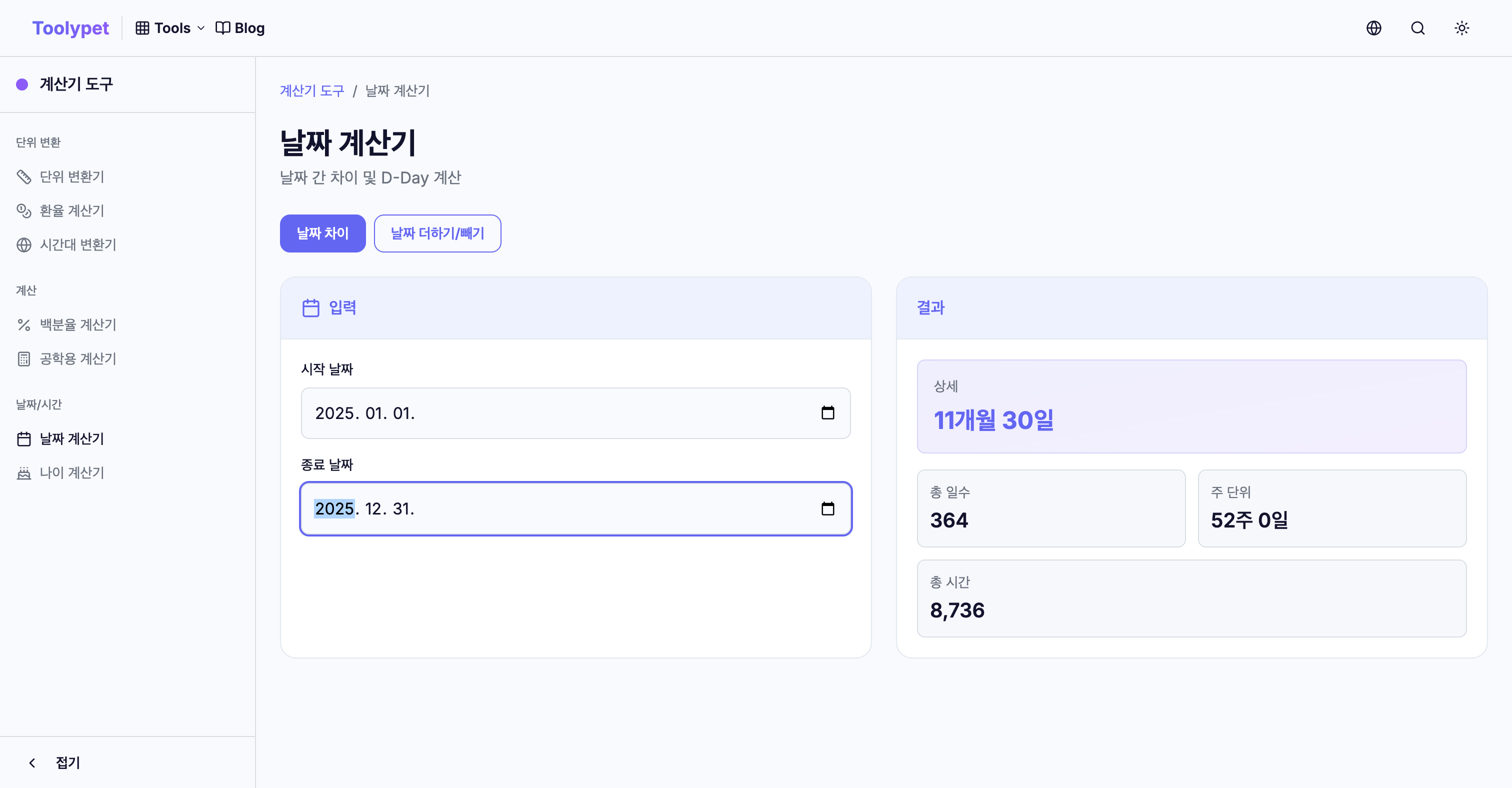
Result Formats:
- Detailed Period: 1 year, 3 months, 15 days
- Total Days: 472 days
- Week Format: 67 weeks, 3 days
- Hours: 11,328 hours
For example, January 1, 2024 to December 31, 2025 is exactly 730 days (2 years). Since 2024 is a leap year with 366 days, and 2025 has 365 days.
Mode 2: Add/Subtract from a Date
Calculate a result date by adding or subtracting a period from a base date.
Use Cases:
- 90 days from today? → Contract expiration
- 6 months ago? → Document issue date
- 2 weeks from now, Friday? → Schedule planning
Enter years/months/days separately for complex calculations like "3 months and 2 weeks later."
Age Calculator - Calculate Your Age
Accurate Age Calculation
The Age Calculator shows comprehensive information from just your birthdate:

Information Displayed:
- International Age: Standard calculation (reflects birthday status)
- Year Age: Current year - Birth year
- Detailed Age: 32 years, 5 months, 12 days
- Days Lived: 11,872 days
- Day of Birth: Tuesday
- Until Next Birthday: D-47
Different Age Calculation Methods
The same birthdate yields different ages depending on calculation method:
| Birthdate | Reference | International Age | Year Age |
|---|---|---|---|
| 1992.06.15 | 2025.12.31 | 33 | 33 |
| 1992.06.15 | 2025.01.01 | 32 | 33 |
International age increases after your birthday passes, while year age increases on January 1st.
Real-Life Applications
1. Work-Related Date Calculations
Contract/Project Management:
- Contract expiration 1 year from start date
- Weeks remaining until project deadline
- Days until quarterly report deadline
HR/Payroll:
- Probation period (3 months) end date from hire date
- Annual leave calculation reference date
- Tenure for severance calculation
2. Personal Schedule Management
Anniversary Calculations:
- 100-day anniversary, 1000-day anniversary
- D-Day until wedding anniversary
- Birthday party prep start date (2 weeks before)
Travel Planning:
- Days until departure
- Total trip duration
- Visa validity check
3. Legal/Administrative Deadlines
Filing Deadlines:
- Tax filings within specific days of acquisition
- Various regulatory submission windows
- Business registration deadlines
Eligibility Requirements:
- Driver's license renewal (10 years)
- Passport expiration
- Various certification validity periods
Important Notes for Date Calculations
Leap Year Handling
How is age calculated for someone born on February 29? Legally, they turn a year older when February 28 ends at midnight. In non-leap years, their birthday is considered February 28.
Date Calculator handles these leap year cases accurately.
"Until" vs "From" Differences
How many days is "January 1 to January 31"?
- Start included, end included: 31 days
- Start included, end excluded: 30 days
This difference matters for legal deadlines or contract periods. Toolypet's Date Calculator typically includes both start and end dates, clearly indicating this in results.
Month Calculation Complexity
What's "1 month after January 31"?
- February 28? (or 29 in leap years)
- March 1? (31 days later)
Since months have different lengths, "1 month" can be ambiguous. Date Calculator handles these edge cases reasonably and shows the exact result date.
Conclusion
Date and age calculations seem simple but require accuracy. Especially for legal deadlines or contracts, a single day's difference can cause major issues.
Don't risk mental calculation errors. Use Toolypet's Date Calculator and Age Calculator for accurate, fast date calculations.
Go to Date Calculator → Go to Age Calculator →
Real-World Applications and Case Studies
Case Study 1: HR Manager Handling Employee Benefits
Jennifer is an HR manager at a mid-sized company. She uses date calculations daily for:
Onboarding Tasks:
- Calculate probation end dates (typically 90 days from start)
- Determine benefit eligibility dates (often 30-60 days after hire)
- Track training completion deadlines
Leave Management:
- Calculate accrued vacation days based on tenure
- Verify sick leave eligibility periods
- Process parental leave durations
Example Calculation: Employee hired January 15, 2025
- Probation ends: April 15, 2025 (90 days)
- Health insurance starts: February 14, 2025 (30 days)
- First review: July 15, 2025 (6 months)
Case Study 2: Event Planner Coordinating Multiple Timelines
Marcus plans corporate events and weddings. His workflow includes:
Countdown Management:
- Vendor booking deadlines (90 days before event)
- Invitation send dates (6-8 weeks before)
- Final headcount deadlines (10-14 days before)
- Setup and rehearsal scheduling
Multi-Event Tracking: Using Date Calculator, he creates milestone schedules for each event, ensuring nothing falls through the cracks.
Case Study 3: Legal Professional Managing Deadlines
Attorney Lisa relies on precise date calculations for:
- Filing deadlines (often 30, 60, or 90 days from trigger dates)
- Statute of limitations tracking
- Contract renewal dates
- Court appearance scheduling
Critical Insight: In legal work, missing a deadline by even one day can have serious consequences. Using a reliable date calculator eliminates human error.
Date Calculation Formulas Explained
Calculating Days Between Dates
Days Between = End Date - Start Date
Considerations:
- Inclusive counting: Add 1 if both start and end dates should count
- Business days only: Exclude weekends and holidays
Age Calculation Formula
International Age = Current Date - Birth Date (in complete years)
Special Cases:
- If birthday hasn't occurred this year: Age = Current Year - Birth Year - 1
- If birthday has passed: Age = Current Year - Birth Year
Adding Months to a Date
When adding months, the result depends on month lengths:
February 28 + 1 month = March 28
January 31 + 1 month = February 28 (or 29 in leap year)
The Date Calculator handles these edge cases automatically.
Leap Year Detection
Leap Year if:
- Divisible by 4 AND
- (Not divisible by 100 OR Divisible by 400)
Leap years: 2024, 2028, 2032... Not leap years: 1900, 2100 (divisible by 100 but not 400)
Frequently Asked Questions (FAQ)
Q1: How does the Age Calculator handle February 29 birthdays?
For people born on February 29, the Age Calculator considers them to have their birthday on February 28 in non-leap years. This follows the common legal interpretation that their age increases when February ends.
Q2: Does "90 days from today" include today in the count?
Toolypet's Date Calculator counts from the day after the start date by default. So "90 days from January 1" would be April 1. This matches most legal and business conventions. The exact counting method is displayed with results.
Q3: Why do I get different results for "1 month later" calculations?
Adding "1 month" can yield different results depending on the starting date:
- January 15 + 1 month = February 15
- January 31 + 1 month = February 28/29 (end of February)
The Date Calculator uses the common convention of moving to the last valid day when the target month has fewer days.
Q4: Can I calculate business days only (excluding weekends)?
Currently, Toolypet's Date Calculator counts all calendar days. For business day calculations, you can use the total days result and estimate (approximately 5/7 of total days are business days), or manually exclude weekends.
Q5: How accurate is the Age Calculator for historical dates?
The Age Calculator accurately handles dates back to 1900. For historical dates, it accounts for leap years and calendar variations. However, for dates before the Gregorian calendar adoption (varies by country), results may not match historical records.
Quick Reference Checklist
Before Important Date Calculations
- Verify the correct start date
- Confirm whether both start and end dates should be included
- Check if the calculation crosses a leap year
- Consider time zones if dates span multiple regions
- Double-check results for critical deadlines
Age Verification Checklist
- Use official birth date from documents
- Confirm the reference date (today vs. specific date)
- Note which age system is required (international vs. other)
- For legal purposes, verify country-specific age rules
- Screenshot or save results for documentation
Project Timeline Planning
- Set clear start and end dates
- Identify all milestone dates
- Calculate buffer time for each phase
- Account for holidays and weekends
- Create backup dates for critical milestones
Common Date Calculation Scenarios
Employment Milestones
| Event | Typical Calculation |
|---|---|
| Probation Period | Hire date + 90 days |
| Annual Review | Hire date + 1 year |
| Vesting Start | Hire date + 1 year (cliff) |
| Sabbatical Eligibility | Hire date + 7 years |
Personal Milestones
| Milestone | Calculation |
|---|---|
| 100-day anniversary | Start date + 100 days |
| 1000-day anniversary | Start date + 1000 days |
| Half-birthday | Birth date + 6 months |
| Golden birthday | When age = birth day of month |
Legal/Administrative Deadlines
| Document | Typical Validity |
|---|---|
| Passport | 10 years (5 for minors) |
| Driver's License | 4-8 years (varies by region) |
| Tax Filing | Within specific days of year-end |
| Visa | 30 days to 10 years |
Summary: Mastering Date and Age Calculations
Date calculations may seem simple, but precision is crucial for legal, professional, and personal planning. Here's how to maximize your use of Toolypet's date tools:
Best Practices:
- Always verify input dates before calculating
- Understand whether your calculation needs inclusive or exclusive counting
- Be aware of leap year effects on your calculations
- Use the detailed results (years, months, days) for precise planning
When to Use Each Tool:
- Date Calculator: Contract deadlines, project timelines, countdown to events
- Age Calculator: Eligibility checks, milestone tracking, official documentation
Pro Tips:
- Bookmark frequently used calculations
- Screenshot results for important deadlines
- Set calendar reminders based on calculated dates
- Verify legal deadlines with official sources
With Toolypet's Date and Age Calculators, you can confidently handle any date-related calculation, from simple countdowns to complex period calculations.